SalesForce announced that it can run off Claude, while it becomes the system of record. ERPNext works off Claude MCP Server and has agents for different tasks. Claude Code can connect to your Atlassian products like Jira or Confluence.
At one time we saw the rise of your headless CMS products? Are we now seeing the rise of the headless enterprise products? And consequently, the death of the UI interface?
If we look at it structurally, we see the following architecture playing out:
- The System of Record: This is where all the data is stored. There’s no change in this and the enterprise product remains your system of record, whether it’s your ERP, or CRM, or any other such product.
- The Access Mechanism: This defines the user rights, roles & permissions, and access control mechanisms. Again this is defined at the product layer
- The Interface: This is the biggest question playing on everyone’s mind now? Do we build a separate interface? Do we keep only a conversational UI interface? Or do we integrate a conversational UI interface within the enterprise product itself. Like Copilot within your Office suite or Gemini within your Google Docs.
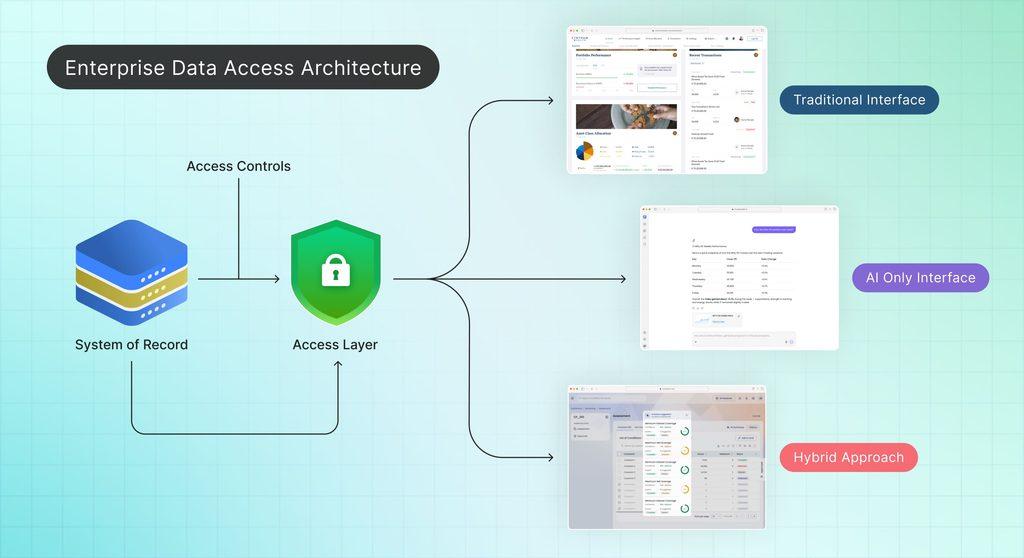
What’s the right approach for building interfaces now?
Let’s look deeper into the different approaches:
Approach 1: Only a Conversational UI
A lot of folks are veering towards this, because of the user behaviour. Users love to chat, as amplified by social media. So why not just give them an interface that exactly allows that. This UI is just a chat interface where users can ask any question or provide any prompt and the AI responds. Want to add a new prospect: “Add Mr X as a prospect with email id and phone number as following”. The AI will follow-up asking you if it’s a hot prospect, what’s the opportunity size and schedule calendar invites. Or have a new task to assign in Jira, just prompt “Assign developer B a new task” The follow-up prompts ask which sprint, the number of story points to be added. Hey, you could just prompt to create a user story directly of Figma and attach it as a task.
What is the conversational UI interface doing? It is primarily analyzing your prompts, routing it to the right agent or API to do a further sub-task (or fetch information or process information) and then responding.
Works beautifully? Yes and No.
Here are few of the challenges:
- Can you prompt well? This interface works for people who know what they have to do and have mastered prompt engineering. What if you have a language issue? Then you may have to add voice prompts, with voice recognition to manage all the variations
- The Not so Happy Path: As a happy path, most of these examples work well. But to take the same example where you are adding a new prospect, the correct flow would actually involve checking for duplicates, first at a prospect level, then at an organisation level. Then validating email ids and phone numbers. So suddenly a flow which just said new prospect added, would become: 3 similar names found, did you mean these folks or create as a new record. Phone number length seems incorrect, please reenter again. So, tasks that typically in a form are taken care of by front-end validations or by auto-complete/drop-downs, now require the user to keep answering.
- The time: Related to the above, in a not-so-happy path the same form that took less than a minute could end up taking a few minutes as you type your prompts, wait for response and get the final output. Even in a happy path, a simple task of booking a flight using normal prompts and responses can take up more time than just using a form. This is understandable as what the AI is doing is first deciphering what you are trying to say, and then invoking the relevant APIs to fetch the data, and formatting it and displaying the output. Whereas, in a structured form, the request/response is clearly defined
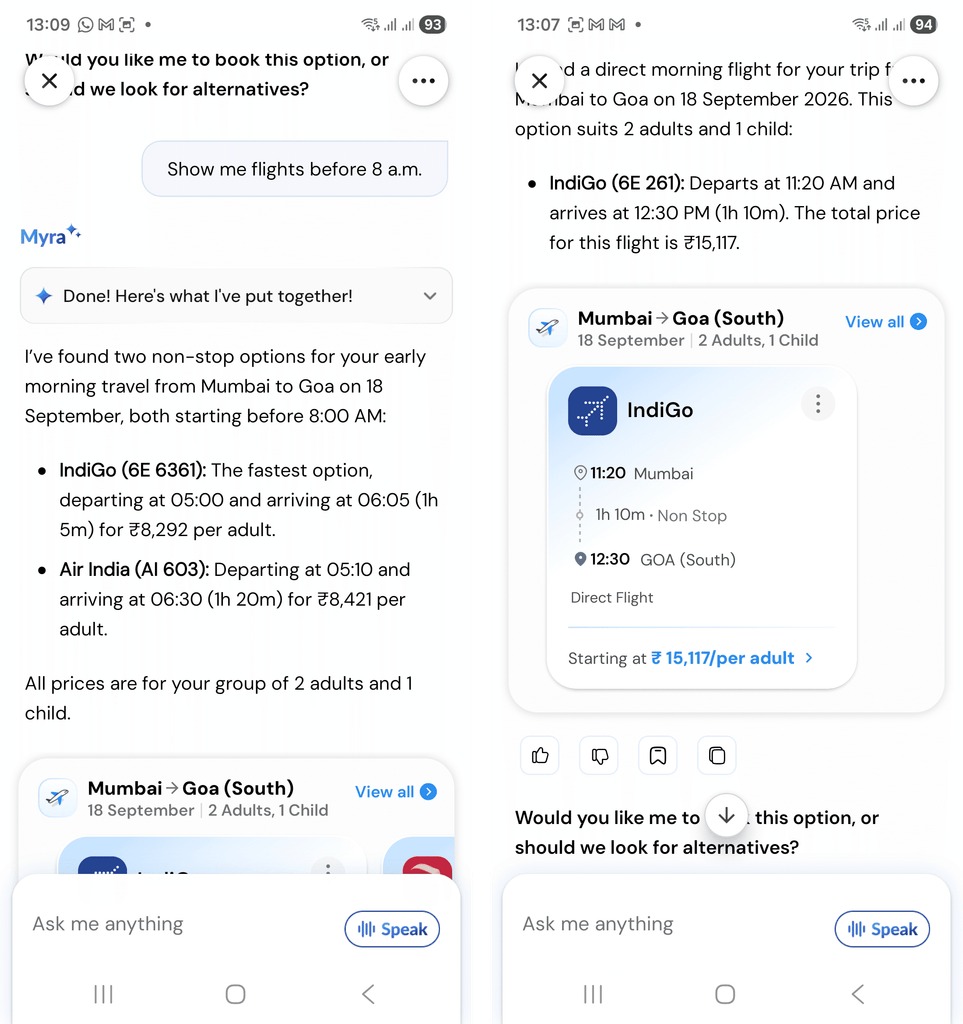
- The format: AI output traditionally relied on markdown. Which meant formatting for tables and nested items would be lost. While there’s progress on that front with use of HTML output, you will find cases where markdown is still getting rendered (see image below–how are you going to decipher this output).

- The cost: You are paying your per seat/license fee for your system of record anyway. On top of this, you will be paying for your token usage. A hidden variable which in the euphoria of being AI-ready often goes unnoticed
- Availability: Related to above is the fact that PTU or token consumption may be curbed/rationed/restricted. So what do you do when you get a 429? Ask your users to wait?
Approach 2: Conversational UI embedded into the product
While SalesForce or Atlassian are allowing its data to be used within Claude, they also have their own AI interface, whether it’s for generative AI or agentic AI. The attempt here is to keep the user hooked on to their product and interface. At the same time, there’s a tighter coupling since the AI interface is deeply integrated with the data.
Approach 3: New Interface
If the products themselves have an AI interface, why not push those interfaces instead of a separate conversational UI? The reason for that is enabling mass adoption and integration.
We are seeing agents getting built every day for the smallest of tasks, and integrating within your routine. So, it’s not enough to just add a new prospect but you will run a prospect analyser to get more data from LinkedIn or other sources, get news about the company, draft an introduction email, and send it with a calendar invite.
When you have these level of integrations across systems, you want a common interface that can do all of it. Link with your emails and calendars, integrate your analytics data, provide the financial reports, and enable you to query across these platforms. This definitely needs a separate interface.
But even with a new interface, the question remains, should it just be a conversational UI?
What works best: Extending the Chat Interface
At Flooid, we have focused on a hybrid approach. There is the traditional interface for users who are looking at a certain metric day in and out and want to focus only on that. At the same time, we have looked at extending the chat interface to embed cards, one-click action, or forms so that the interface doesn’t end up consuming more time or tokens than required.
A general principle is that when you have a deterministic task (open an account, or book a flight from point A to B on specific date, for example) the conversational UI should also be deterministic or form based. When the task is exploratory (what are possible saving and FD accounts, what are possible vacation plans for summer), then the interface can be more conversational in nature. Even tasks that are querying an existing data output can be conversational, if you want insights of a financial spread, you can
In conclusion, there isn’t a one-size-fits-all approach to designing AI-first interfaces. And unless architected well, an AI-only interface can have more problems than it seeks to solve. So yes, the interface is not dead—not as of now. Just has found a new room to reside in.