A decade ago, people were arguing about XD vs Figma, with a few die-hard fans still rooting for Photoshop. Then came the developers who said “why design when you can bootstrap”?
The entire debate has now shifted.
We know have AI design tools from Google (with Stitch) as well as Claude Design from Anthropic apart from Figma Make going ahead. Designers are cautiously threading the AI ground while developers again asking “why design when you can AI”?
Which tool is better? Is it useful for designers? We decided to do what we know best. Put them all under the radar. And test how they work.
AI Tools | Unboxed: Part I
We broke up the test into two parts:
- Create a single page without any design system
- Create a multi-part application with design systems in place, history, model selection
For part 1, we tested for ease of use, time taken, any follow-up prompts or questions that were required, the UX, the UI and the content. Here’s what the tests reveal.
How it works
Claude Design
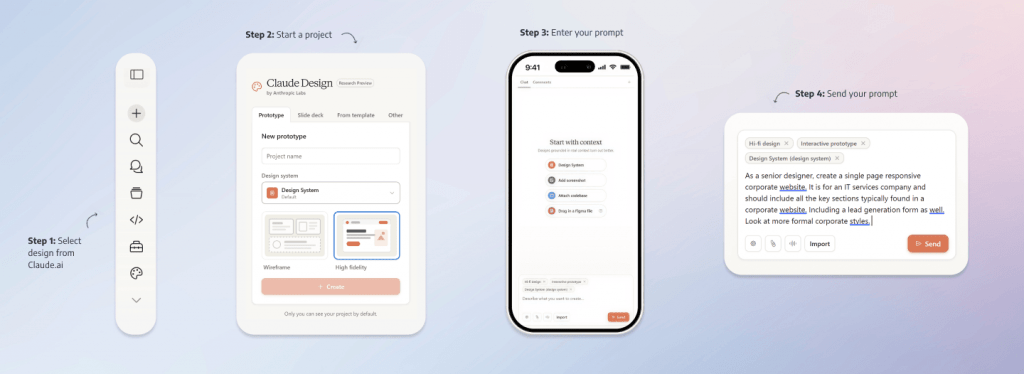
To initiate Claude Design, go to claude.ai, select Design and enter your project details.
Claude Design allows you to create prototypes, slide decks, create from a template, and others. For purposes of part 1 testing, we used prototypes. We used high-fidelity and default design system.
Once you select Create, you will be asked to prompt about your design. You can aid by attaching design systems, screenshots, codebase or even a figma file (.fig).
You have options to enter voice input or change model. For purposes of this test we used the default Claude Sonnet 4.6 model.
Stitch
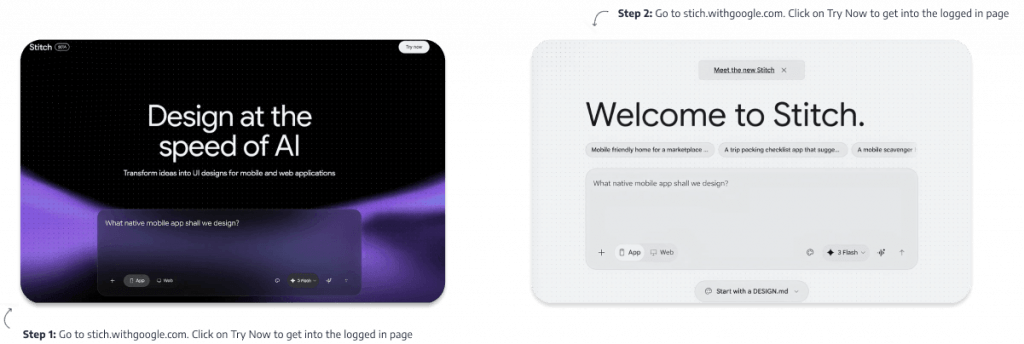
Go to stitch.withgoogle.com. Login (by selecting Try or entering any prompt), and you can then select app or website and enter your prompt. You have option to select model (we went with the default 3 Flash, but you have option of 3.1 Pro, redesign and ideate as well). There’s live mode and ability to attach a screenshot, sketch or visual inspiration.
You can use a design system or start with a design.md file as well.
Once you generate, Stich creates the design systems, and maps out the components, creates the UX flow and then renders the design file.
Figma Make
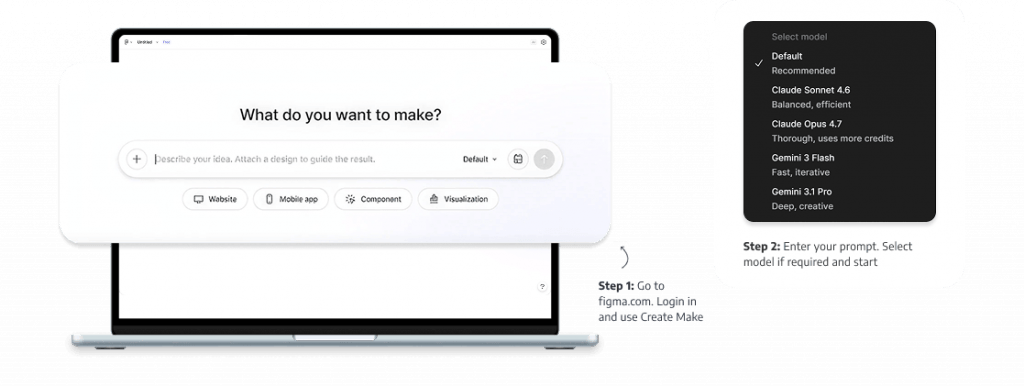
Once you login to Figma, select Make as an option and directly enter the prompt of what you want to make. You have options to select the model (we want with default) with options of Claude Sonnet 4.6, Claude Opus 4,7, Gemini 3 Flash, Gemini 3,1 Pro as well.
You can attach a design system (or Make Kit as Figma calls it now), and decide if you want to create a website, app, component or a visualization. You can also attach images and files if required.
Time Taken
Claude Design
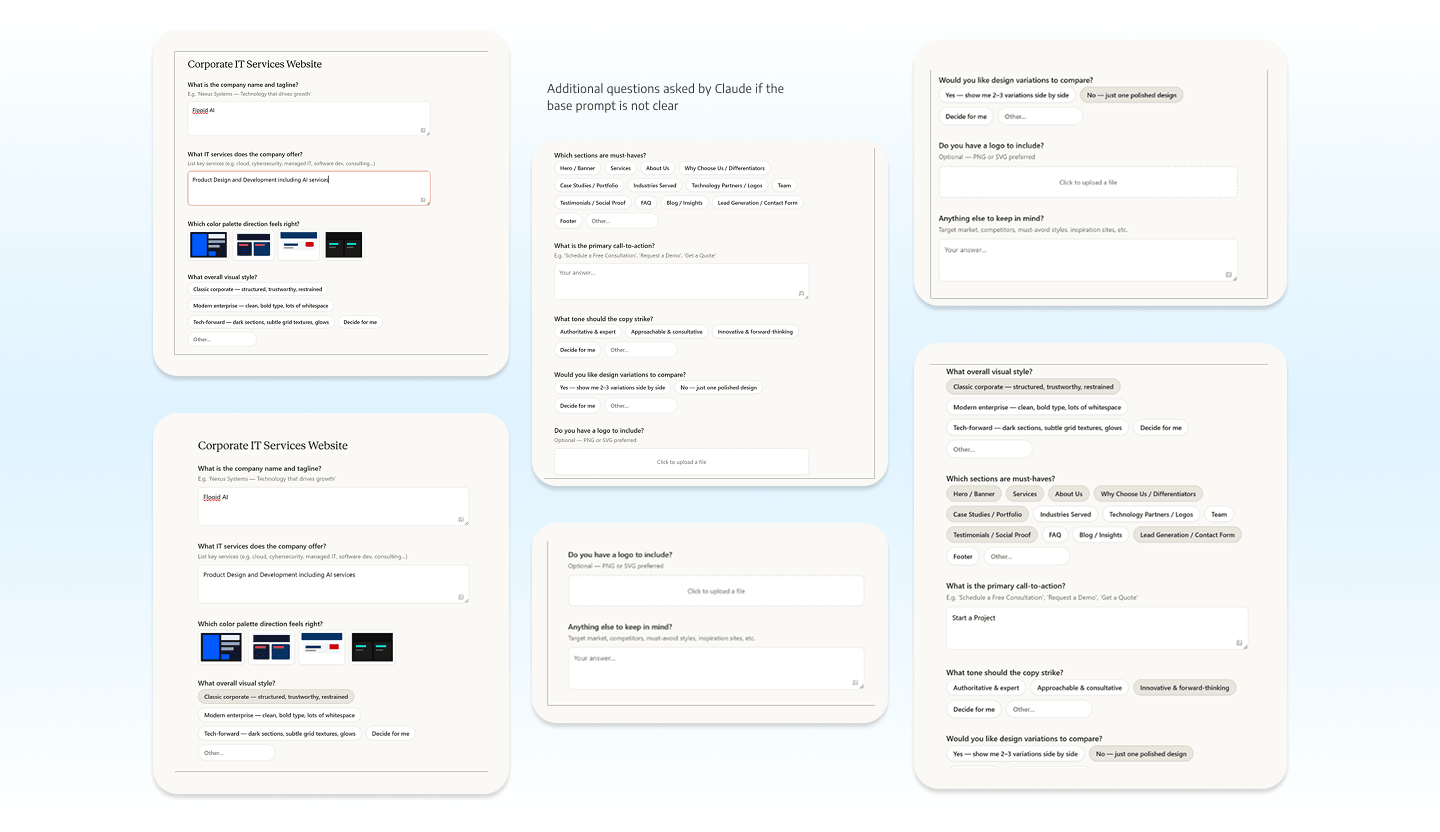
Once we gave our standard prompt to Claude Design, it started with a set of follow-up questions (see screenshots below) in about 15 seconds (about 8 of these questions ranging from company name to sections, to design styles), After that in another 4 minutes it rendered the output, taking a total of 4 minutes and 15 seconds. Stitch works on the prompt given and generates a design system and then outputs the site in 1 minute 40 seconds. Figma Make works on the prompt given and generates the output in 2 minute 35 seconds.
UI/UX
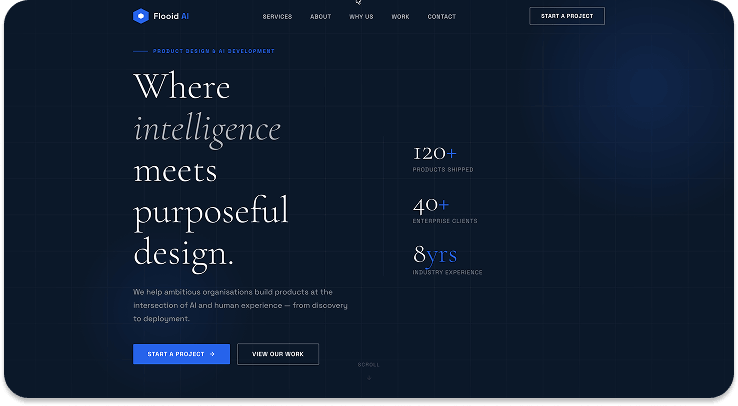
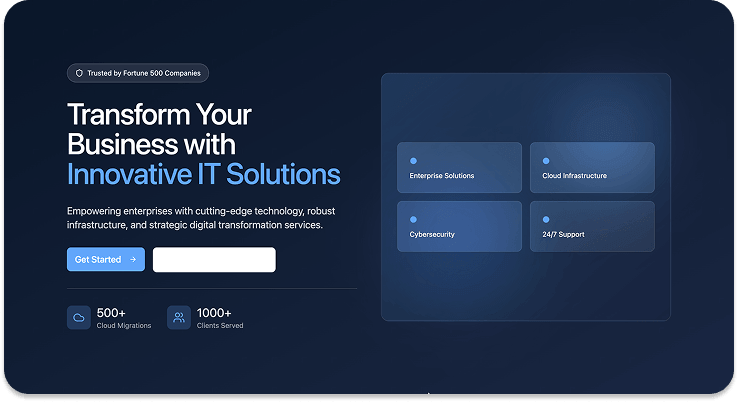
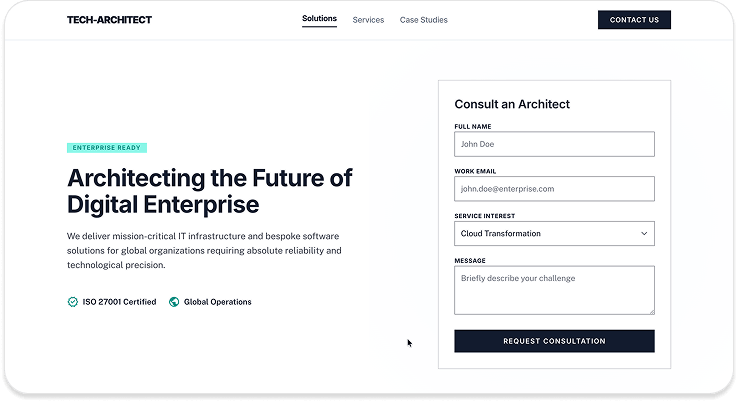
Claude’s output definitely seems superior to what Figma Make or Stitch produces. Part of the reason can also be the additional questions that Claude asks, which helps to refine the design. The overall output does have more modern feel to it, with soft colours and borders as against Stitch’s very boxy design.
In Claude and Figma Make you can see better use of interactions, hover states and such controls. Claude also offers superior editing controls (without AI) as opposed to Figma Make and Stitch.
Click here to view the prototype
Click here to view the prototype
Click here to view the prototype
Content
Claude scores on this one with coming up with better headlines, and including mock data points and highlights. Figma Make also comes up with some data points, while Stitch uses more formal language. To be fair that was part of the prompt, and Claude can be faulted to go against the brief.
Output Controls
Claude Design
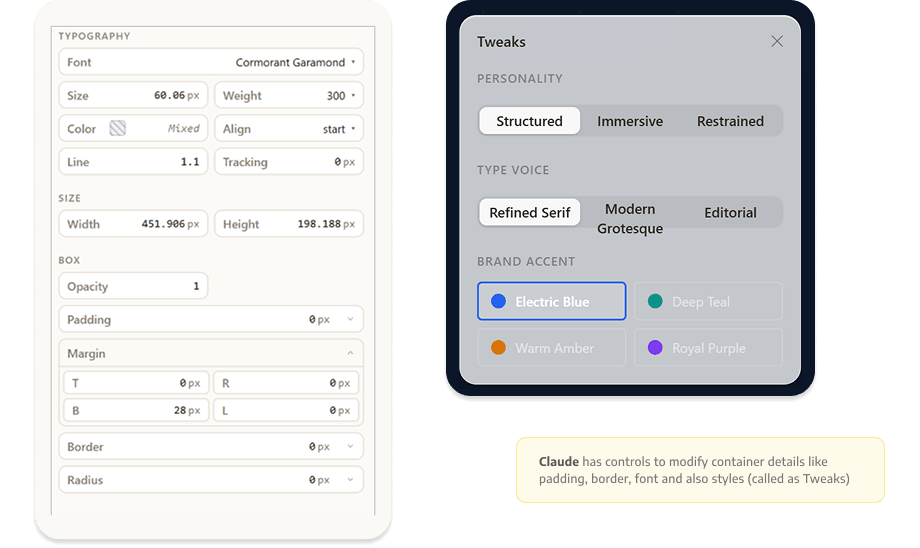
Claude allows you to edit sections, draw, comment. You can select any card or section, and you get options to change typography, padding, opacity, border radius. Claude also allows you to generate tweaks which are basically global changes. You can change type, colour accents, or personality – though we couldn’t really figure out any dramatic difference with that.
Stitch
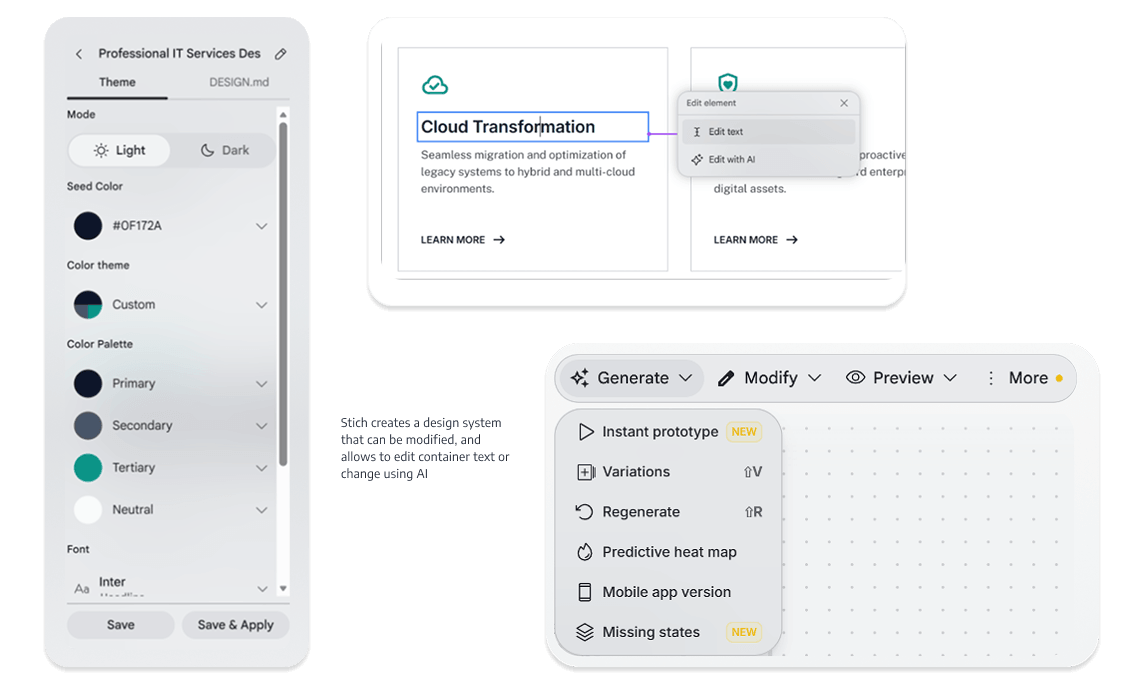
Stitch allows you to modify by selecting an element and editing with AI or edit the text. You can also modify the design system that it generated.
Figma Make
Figma Make allows you to copy the design onto Figma (useful when you have to go from prototype to actual designs). You can select any section and edit properties such as font, colour, size, alignment, spacing or edit the same with prompt.

Ease of use
Claude follows a simple prompt on the left pane and output in the centre with Figma Make also doing the same. This is something most of us are used to. Output controls are either in the left pane or on top. Claude utilizes space better where it shows a right pane when you select any object or container. Figma Make shows up the same below the selection.
Stitch in that respect follows more the GenSpark route where the output is a continuous canvas. Controls are also therefore on the Canvas with both a top control and right pane control. The re-prompting is also on the central pane while the thinking happens on the left. From that respect, Stitch can be a bit difficult to use and understand and can be confusing with all the controls (seems more Adobe with its multiple windows and tabs).
What’s right for you? Depends on what you are planning. If you don’t want to do any thinking or create any design system of your own, then maybe start off with Stitch or Figma Make. But if you have some idea of what you want, then Claude Design can be a good starting point. If you are a product manager, Claude might work better. And as a starting off designer, Figma Make will give you the flexibility to move between Figma and Make. And the million-dollar question–can you create a complete production-ready site with AI tools? Our designers would feel otherwise, and point out evident issues (looks too basic, icons are stock, animations will elevate the experience). But stay tuned for another article on where AI can play a role in design, and the challenges of using only AI.
Also do remember: the tokens that Claude provides for designs are quite restricted, and Figma Make is moving in similar direction. For the current experiment, Claude used up 27% of weekly design usage, while Figma Make used 50 out of 3,000 monthly usage while Stich used 5 out of 400 daily usage.
Look ahead for Part 2 where we explore the AI tools deeper with hopefully Figma and Anthropic giving us some more tokens to run a comprehensive test (hint, hint, Anthropic, Figma).